


Zoom · Teams
Calls & Meetings
Translate live conversations in Zoom, Microsoft Teams, Google Meet, or Discord on Windows and Mac. Follow colleagues in your language.
Learn moreInstant translation on your Windows PC, Mac or iPhone. Watch foreign streams, play games, and understand calls on Windows and Mac. No language barriers.


A quick look at what StreamVox does, how it works, and why it is different. Nothing to install just to watch.
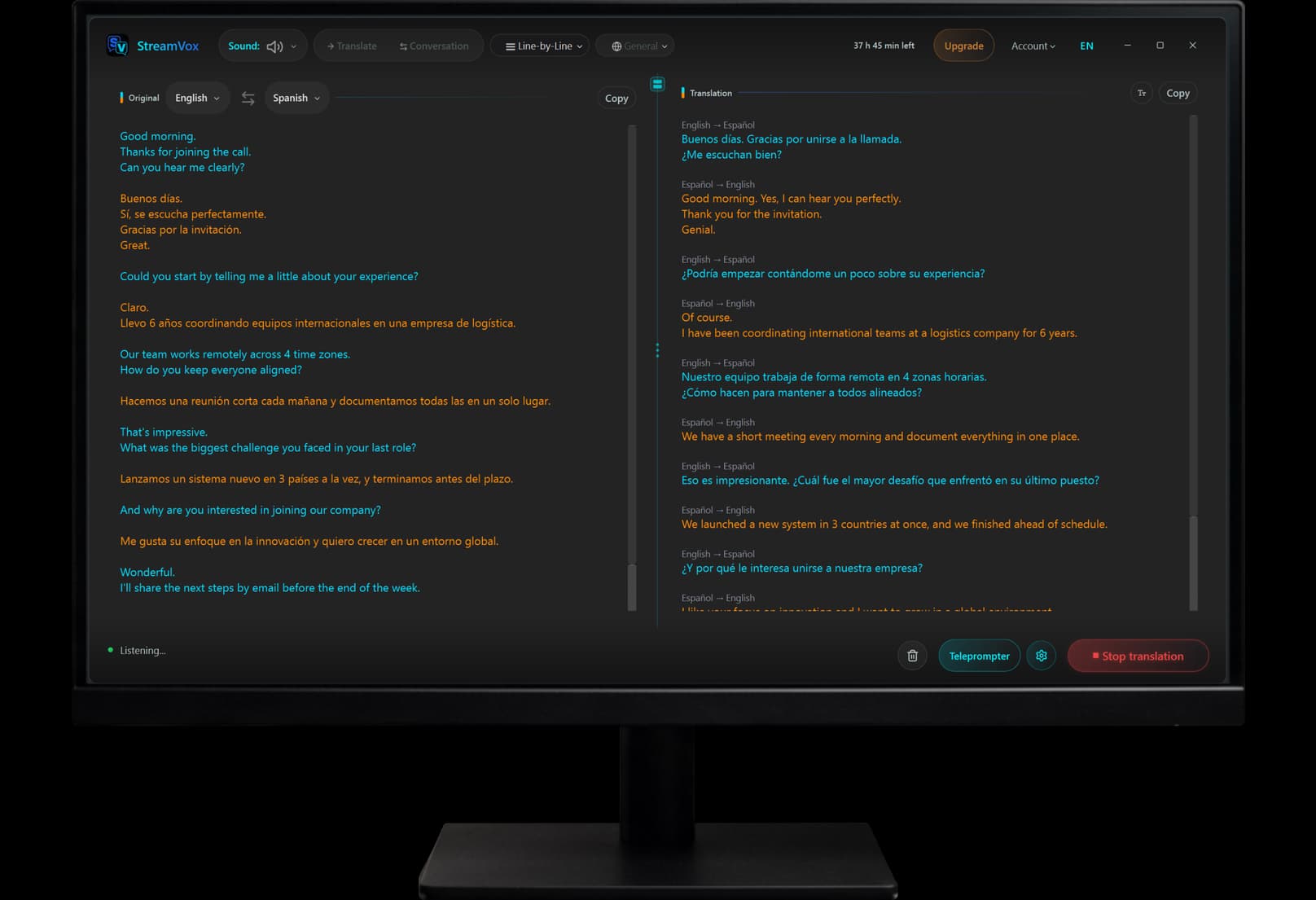
Translate turns any audio into subtitles in your language; Conversation interprets both sides of a live dialog. Read along in the main window, or in the always-on-top teleprompter.
Translate & Conversation modes · main window and teleprompter overlay
StreamVox for iPhone listens to the room around you or to what your phone is playing, and puts the translation on screen or in a small window that follows you into other apps.
Subtitles for the speech around you, or for what your phone is playing.
Translate & Conversation modes · teleprompter over any app
StreamVox now reads translations aloud in real time, with voices synthesized privately on your device. Keep your eyes on the call or game and just listen. Free on every plan.
21 languages · neural voices built into the app, synthesized on your device
Around 40 languages · StreamVox speaks with the voices already on your Mac or iPhone
StreamVox adapts to your workflow, providing instant translation wherever audio plays.
Translate live conversations in Zoom, Microsoft Teams, Google Meet, or Discord on Windows and Mac. Follow colleagues in your language.
Learn moreOn Windows, connect iPhone or Android via Microsoft Phone Link. On Mac, answer your iPhone calls with Apple Continuity. Either way, StreamVox subtitles your calls live on screen.
Learn moreWatch YouTube, Netflix, or Twitch without waiting for official subtitles. Use overlay mode on top of any video player.
Learn moreGet real-time subtitles for in-game voice chat or live streams. Perfect for multiplayer games tailored for any language.
Learn moreFlexible plans for every user. Start breaking language barriers today.
Experience the magic of real-time translation with daily free access.
Unlock the full power of real-time AI translation on Windows, Mac and iPhone.
For active users who need more translation time for streams and movies.
No limits. Translate all day, every day.
Get StreamVox
Free to download. Sign in and subscribe right inside the app. One subscription works on Windows, Mac and iPhone, one active device at a time.
14-day money-back guarantee.
Buying for an organization? Licenses for several people on one invoice, for as many months as you need. StreamVox for organizations
Have questions? Check our Terms of Service or Refund Policy.
Releases, roadmap and support, directly from the developer. Active Discord community.
Release notes and product updates the moment they ship.
Detailed list of every fix, tweak and new capability.
See what's coming next, vote on it and discuss it with the developer.
Suggest what you want next. Top-voted ideas ship sooner.
Report issues directly to the developer and get a fast turnaround.
Get help from the community and the developer himself.
Free · Discord account required
Tips, tutorials, and guides for real-time translation
Detailed comparison of StreamVox and Otter.ai. Which is better for real-time translation vs transcription? We break it down.
Need to translate audio, not just text? StreamVox shows live AI subtitles over calls, videos and games on Windows. See how DeepL and Google Translate compare.
Can live translation cover both sides at once? Yes: Conversation mode translates two speakers on one computer, and on Zoom or Teams each person runs StreamVox.
Real, verified store reviews, including criticism and our replies. We answer every comment.
Kurt
VerifiedI have been using Stream Vox for a while now, the program fully meets my expectations. Improvements are made all the time and customer service is very easy to get hold of. Highly recommended
Krepsik228
VerifiedUsed Conversation with a friend who barely speaks English. Put the phone between us and it split both sides into different colors so it didn't turn into one messy block of text. A couple of lines came in late when we talked over each other, but we still got through dinner without pointing at Google Translate the whole time.
Juan
VerifiedStream Vox has genuinely made my job as an interpreter so much easier. Having real-time transcription while I'm working helps me keep track of important details, names, numbers, and information without losing focus on the conversation. It has made my workflow feel significantly faster and less stressful. I'd honestly say it makes my job 10x easier. If you work as an interpreter, especially in fast-paced calls where accuracy matters, Stream Vox is an incredibly useful tool.
Hi Juan, thank you so much for sharing this - really glad StreamVox is making such a difference in your interpreting work. Keeping track of names, numbers and details in fast-paced calls is exactly the kind of use case we built the real-time transcription for, so it's great to hear it's working well for you. If you ever have suggestions to make it even more useful for interpreters, we'd love to hear them.
SkYl1nee
VerifiedI've been using that app for a while, can't complain about anything. Reasonable price compared to other applications and easy to use on daily basis. All the basic functionality works smooth, the translation happens rapidly.
Thank you for the kind words. Reviews like this are a real motivation to keep going and to build more interesting things into StreamVox.
Dustyn
VerifiedC: It works but I really just hate the not permanently free, I wish there was a completely free one.
Thanks for trying StreamVox! We totally get it. The app relies on cloud services that we pay for monthly to provide real-time speech recognition and translation — so the subscription helps us keep things running. That said, the free tier is always available with daily limits so you can still use the core features at no cost. Appreciate the feedback! 🙏
Андрей
VerifiedIn meinem Team arbeiten Leute aus 5 verschiedenen Ländern und die Akzente in Gesprächen waren ein Albtraum. StreamVox zeigt mir in Echtzeit, was jeder sagt. Ich folge Meetings jetzt wirklich – statt nur zu nicken und zu hoffen.
Anonymous
VerifiedPlay a lot of games with people from different countries. Voice chat was basically useless. Streamvox overlay sits in top of games and shows live subtitles.
Kurt
VerifiedI have been using Stream Vox for a while now, the program fully meets my expectations. Improvements are made all the time and customer service is very easy to get hold of. Highly recommended
Krepsik228
VerifiedUsed Conversation with a friend who barely speaks English. Put the phone between us and it split both sides into different colors so it didn't turn into one messy block of text. A couple of lines came in late when we talked over each other, but we still got through dinner without pointing at Google Translate the whole time.
Juan
VerifiedStream Vox has genuinely made my job as an interpreter so much easier. Having real-time transcription while I'm working helps me keep track of important details, names, numbers, and information without losing focus on the conversation. It has made my workflow feel significantly faster and less stressful. I'd honestly say it makes my job 10x easier. If you work as an interpreter, especially in fast-paced calls where accuracy matters, Stream Vox is an incredibly useful tool.
Hi Juan, thank you so much for sharing this - really glad StreamVox is making such a difference in your interpreting work. Keeping track of names, numbers and details in fast-paced calls is exactly the kind of use case we built the real-time transcription for, so it's great to hear it's working well for you. If you ever have suggestions to make it even more useful for interpreters, we'd love to hear them.
SkYl1nee
VerifiedI've been using that app for a while, can't complain about anything. Reasonable price compared to other applications and easy to use on daily basis. All the basic functionality works smooth, the translation happens rapidly.
Thank you for the kind words. Reviews like this are a real motivation to keep going and to build more interesting things into StreamVox.
Dustyn
VerifiedC: It works but I really just hate the not permanently free, I wish there was a completely free one.
Thanks for trying StreamVox! We totally get it. The app relies on cloud services that we pay for monthly to provide real-time speech recognition and translation — so the subscription helps us keep things running. That said, the free tier is always available with daily limits so you can still use the core features at no cost. Appreciate the feedback! 🙏
Андрей
VerifiedIn meinem Team arbeiten Leute aus 5 verschiedenen Ländern und die Akzente in Gesprächen waren ein Albtraum. StreamVox zeigt mir in Echtzeit, was jeder sagt. Ich folge Meetings jetzt wirklich – statt nur zu nicken und zu hoffen.
Anonymous
VerifiedPlay a lot of games with people from different countries. Voice chat was basically useless. Streamvox overlay sits in top of games and shows live subtitles.
Giruckis
VerifiedWas skeptical at first but tried it on a YouTube video in German and it translated everything on screen instantly. The floating window stays on top of any app which is super handy. Tested it on Teams calls too - works great. Clean dark UI, easy to set up, does exactly what it promises
Thank You for feedback 🫶
Anonymous
VerifiedMy family speaks a different language and calls were always awkward. Connected my phone through Phone Link and Stream Vox shows live subtitles for actual phone calls on my PC screen. Never seen anything like this before. Simple app, great idea, saves me from a lot of confusion.
Yosief
Verifieda great app ....helps a lot for any language barrires
Thank you, Yosief! 🙏🫶
Marks
VerifiedNeeded subtitles for international Zoom calls. This works great. Fast, correct, easy to use. Free tier is generous. Recommended.
Thank you, Marks, for your positive feedback!
andrejs
VerifiedStreamVox delivers lightning-fast translation exactly as promised. I use it for business conferences, and the low latency makes conversations feel natural. A must-have app for Windows users.
Thanks a lot for the 5 stars, Andrejs! 🚀 We're thrilled that StreamVox helps you navigate international calls seamlessly. We worked hard to minimize latency, so it's great to hear it's paying off in your meetings. Thanks for recommending us!
정민
VerifiedI purchased this app on a paid basis and am actually using it. As someone who plays games on another overseas server, I heard that translation is essential when playing games together. As I can communicate after finding this app, the game has become more enjoyable, and it is never a waste of money to pay for a subscription to this app. If you have a regret or opinion, the developer sees it, helps it, or fixes it, so if you have a complaint, you can respond almost immediately. This app is highly recommended for those who play games abroad like me. Since I am a real user, I keep adding suggestions and wishes to the developers, so I update them often.
Thank you so much for the kind words, 정민! 🙏 It means a lot to hear StreamVox helps you enjoy games with friends on overseas servers — that's exactly what we built it for. Keep sending your suggestions, I read every single one and ship updates regularly. See you in the next release!
Giruckis
VerifiedWas skeptical at first but tried it on a YouTube video in German and it translated everything on screen instantly. The floating window stays on top of any app which is super handy. Tested it on Teams calls too - works great. Clean dark UI, easy to set up, does exactly what it promises
Thank You for feedback 🫶
Anonymous
VerifiedMy family speaks a different language and calls were always awkward. Connected my phone through Phone Link and Stream Vox shows live subtitles for actual phone calls on my PC screen. Never seen anything like this before. Simple app, great idea, saves me from a lot of confusion.
Yosief
Verifieda great app ....helps a lot for any language barrires
Thank you, Yosief! 🙏🫶
Marks
VerifiedNeeded subtitles for international Zoom calls. This works great. Fast, correct, easy to use. Free tier is generous. Recommended.
Thank you, Marks, for your positive feedback!
andrejs
VerifiedStreamVox delivers lightning-fast translation exactly as promised. I use it for business conferences, and the low latency makes conversations feel natural. A must-have app for Windows users.
Thanks a lot for the 5 stars, Andrejs! 🚀 We're thrilled that StreamVox helps you navigate international calls seamlessly. We worked hard to minimize latency, so it's great to hear it's paying off in your meetings. Thanks for recommending us!
정민
VerifiedI purchased this app on a paid basis and am actually using it. As someone who plays games on another overseas server, I heard that translation is essential when playing games together. As I can communicate after finding this app, the game has become more enjoyable, and it is never a waste of money to pay for a subscription to this app. If you have a regret or opinion, the developer sees it, helps it, or fixes it, so if you have a complaint, you can respond almost immediately. This app is highly recommended for those who play games abroad like me. Since I am a real user, I keep adding suggestions and wishes to the developers, so I update them often.
Thank you so much for the kind words, 정민! 🙏 It means a lot to hear StreamVox helps you enjoy games with friends on overseas servers — that's exactly what we built it for. Keep sending your suggestions, I read every single one and ship updates regularly. See you in the next release!
Everything you need to know about StreamVox
Can't find what you're looking for?
Browse our full Help Center or ask the community on Discord.